
Changelog
What arrived in each version of the Celestial Vault, from the v1.0 launch to v2.1.0 Your Streak, Your Rules.
The Celestial Vault evolves in place: updates reach you through the built-in auto-updater, no re-download or re-import needed. This page tracks what each milestone brought.
v2.1.0 · Your Streak, Your Rules (July 2026)
A release about ownership: of your streak, of your history, of your old notes. The streak now completes on your terms, its record lives in a note you can edit by hand, and the importer treats an old vault like the archive it is.
On v2.0.x? This update needs one click.
v2.0.x builds shipped with automatic update checks accidentally switched off, so this update won't announce itself. Open Settings → Celestial Plugin → Updates and click Check for updates to get v2.1.0. From then on, automatic checks are on and stay on.
Your streak, your rules
- Streak completes when: a new setting in the Journal Widget section with six ways to complete a day: naming your day (the default), writing anything in today's daily note, reaching a configurable word goal, creating any note, creating a unique note, or manual
- Manual mode: a Complete today button inside the streak calendar (click the widget to open it), for streaks that mean exactly what you decide they mean
- Editable history: the streak record now lives in a plain note,
Time Garden/Streak History.md, one- [x]line per completed day. Edit it by hand and the widget follows. An Open history file button in settings jumps straight there
See The Journal Widget for the full picture.
An importer you can trust with anything
- Attachments come along: PDFs, canvas files, audio, video, and every other file type, with your folder structure preserved
- Nothing is ever overwritten: name collisions get a
(2)style suffix instead of replacing your files - Imported notes stay verbatim: the templating engine never touches imported content. Previously, complex vaults could hit a "Template parsing error" and content could be silently modified
- An honest summary: the report at the end counts exactly what was imported, what was skipped, and what errored
Small things that add up
- Quick Switcher veils: opening a daily, monthly, or yearly note from the Quick Switcher now plays the navigation veil instantly, with no glimpse of the note first
- New note location: a settings signpost to the Unique note creator options (folder, filename format, template), so it's obvious where new notes land
- Perks: a new settings section with a discount code that makes the Time Garden source code snippets free for Celestial owners on timegarden.store
- Templater 2.23 compatibility: a Templater update silently turns off its own new-note trigger and journal notes arrive blank; the vault now re-enables it automatically on every device, respecting a deliberate opt-out. (The full story.)
- Friendlier update errors: a brief update-server outage now reads like an outage, not like a problem with your license
v2.0 · The New Atmosphere Release (June 2026)
Nine days since launch, and the vault has barely left the workbench. This is the release it was all building toward: a living, hand-crafted sky, a vault you can shape with a single sentence, and the speed to carry all of it without breaking a sweat. Atmosphere. Control. Speed. Everything below arrived in this stretch and lands as one milestone. This is the Celestial Vault becoming what it was always meant to be.
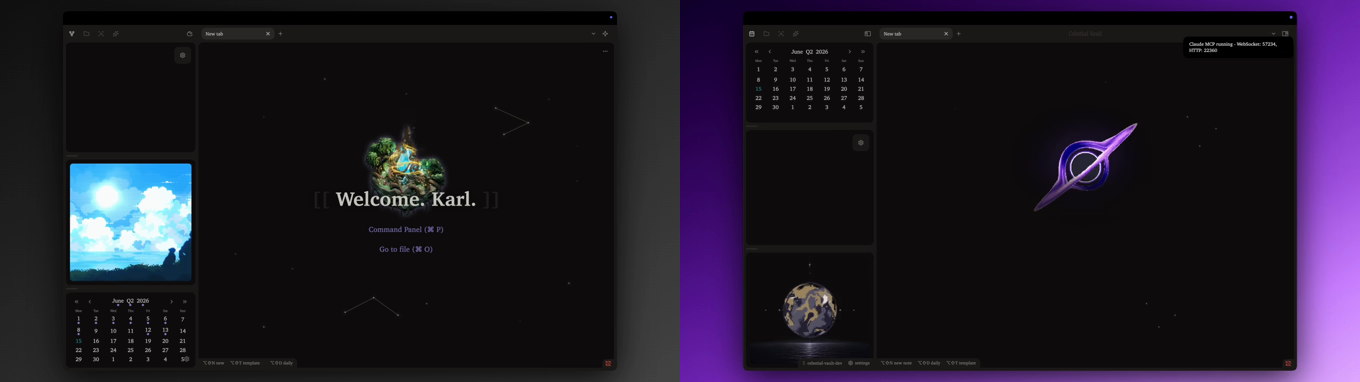 v1v2.0
The same vault at launch (left) and at v2.0 (right), side by side.
The New Atmosphere Release is here
Own the Celestial Vault once and keep it for life, and every update like this one arrives in place, no re-download. Get the Celestial Vault
A new atmosphere
Every banner in the vault is custom-made pixel art, hand-tuned and hand-animated for this vault and nothing else. Seven daily banners, one for each day of the week. Twelve monthly banners, one for every month of the year. And every one is alive: skies drift, light shifts, the world quietly breathes behind your writing. Your journal no longer rests on a picture. It rests inside a moment that moves with you.
- A banner for every day: seven bespoke weekday scenes, each one custom-made and animated by hand
- A banner for every month: twelve scenes that carry the whole year, each its own mood
- Custom-made and hand-tuned: a cohesive pixel-art world made for the Celestial Vault alone, not stock, not borrowed
- Light on your disk: the whole set is animated AVIF, so all that motion costs almost nothing to store
- It arrives in place: existing journals pick up the new art automatically, no re-download, no re-import
A universe to come home to
Open a fresh tab and fall into a small cosmos.
- A living empty tab: a layered black-hole scene with an animated wallpaper, a soft glow, infalling stardust, twinkling constellations, and a personalized greeting
- A launch sequence: a short metamorphosis plays the first time you open the vault each day, replayable whenever you want it
- Clickable action pills: jump straight into your command panel or note switcher from the empty tab
Customize anything
The settings became a place you command, not a place you hunt through.
- Search anything: a glowing field pinned to the top of your vault settings. Type "banner", "streak", "font", anything, and it appears at once
- One search, three worlds: every vault setting, all 341 theme controls, and the documentation, answered in a single box
- Jump and flash: click a result and you land right on that control with a soft flash, so nothing hides in a long page again
- 341 theme controls: colors, sidebars, typography, tables, callouts, and more, across roughly 50 sections, every one pre-calibrated to the shipped look with a restore arrow
- Pinned ribbon and hover-reveal sidebars: keep the icon ribbon visible, or let collapsed sidebars slide in when your cursor touches the window edge
- Your fonts, your wordmark: live interface, body, and monospace font controls, plus a toggle to hide the branding whenever you want the screen purely your own
- The widget reveals its secret: hover the streak widget and a "Streak calendar" hint appears, surfacing the history view that was always there
A native-speed foundation
We measured the running vault from the inside and chased every last cost until one truth held.
- As fast as plain Obsidian, black hole and all. Idle, the vault costs almost nothing, and the entire scene is painted by your graphics card, not your battery
- Snappier note switching, with banners that no longer redraw every time you move between notes, and big journals that open faster
- Lighter on launch, and steady through hours of writing
- A full banner wardrobe: Faded, Vivid, and Cinematic are now a preset that sets three independent dials you can tune yourself, Title shadow, Vertical darkening, and Bottom fade, plus a vertical crop. Every preset retuned so even the boldest look feels finished
- A liquid shortcut bar: change context and the bottom band gently blurs, glides to its new width, and resolves, while the shortcut you just pressed stays sharp and glowing as the still point
- At home on any setup: a layout and zoom calibrated to your screen during onboarding, banners and bars that look right on any community theme, and a cursor that lands in the writing area when you reopen a daily note
Everywhere, and yours forever
- Full mobile support: the vault, the widget, and the journaling flow work on phones and tablets
- The built-in auto-updater: license-checked updates with changelogs, applied in place from inside Obsidian, no re-download
- Bring your old vault: import an existing Time Garden and the vault converts its notes to render correctly here
- Open to your liking: choose what greets you at launch, your last session, today's daily note, or the empty-tab scene
See Banners and images, the shortcut bar, and the Celestial theme.
Studio notes
Since launch the vault has kept improving. Now that the rich scene costs almost nothing to run, the vault can afford to be this beautiful everywhere, so it got a new sky. You did not buy a finished thing and watch it gather dust. You bought something that keeps getting better with each release.
v1.0 · Launch (May 2026)
The first release of the Celestial Vault:
- The Celestial theme with day, month, and year color theming
- The journal widget with streak tracking and vault mode
- The dynamic shortcut bar with context-aware hotkey hints
- The four veils: creation, deletion, navigation, and graph transitions
- Wikilink categories with database views on every category page
- Time Garden journaling with AI features, unlocked by the same license
- The welcome experience: nickname, license, import, and a guided tour